Use One Search Field for Keywords and Links
The same form handles music searches and a YouTube Link. Clipboard paste may request optional permission; you can decline and use the keyboard shortcut or your phone's manual Paste command instead.

Welcome to Y2Mate, a browser-based YouTube downloader and converter for MP3 files and MP4 videos. Use keyword search to find a video, or paste a YouTube Link to open its conversion choices directly. This YouTube Downloader lets you prepare a listening file or retain the video through available format controls. Downloads depend on source access, conversion service availability and applicable restrictions.
The local chart is temporarily unavailable. Search for a title or artist above.




 Download


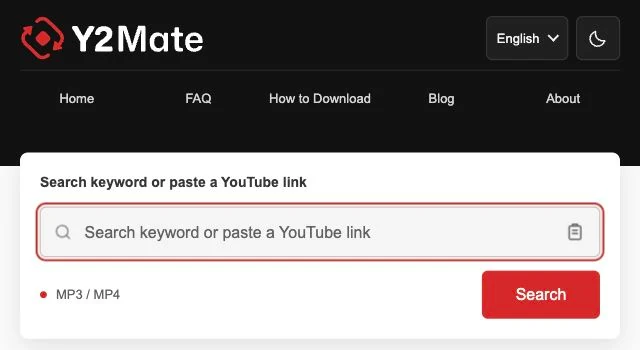
Enter a song title and artist, then press Search to find matching videos. If you already have the intended video's YouTube Link, paste it into the search field and select Convert.
Open the matching video from the results and check its details. Choose MP3 for listening or MP4 for viewing, using only the bitrate or resolution choices offered for that selection.
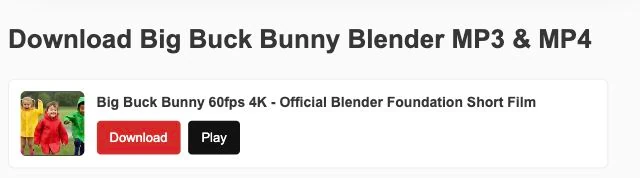
Select Download once the file is ready. Your browser may ask where to save it or use a preset folder; check its download indicator before closing the page or opening the file.
The same form handles music searches and a YouTube Link. Clipboard paste may request optional permission; you can decline and use the keyboard shortcut or your phone's manual Paste command instead.
Trending provides another route to music searches: its Download button starts a song search. A related song's Download button opens conversion instead, so confirm the selected version before proceeding.
Use the appearance control to switch between light and dark themes. The browser interface accommodates different screen sizes, with controls arranged to suit the space available on phones and desktop displays.
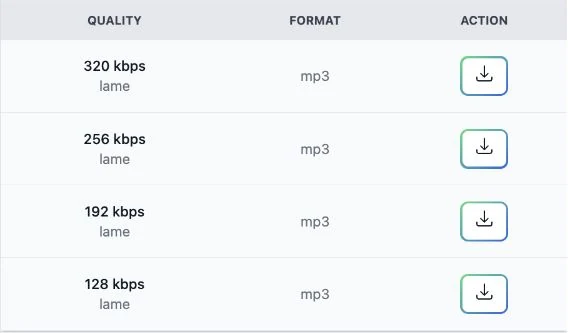
Choose an MP3 download when you need listening rather than the video's visual content. A YouTube Mp3 Downloader may offer MP3 320kbps, 256kbps and 128kbps, depending on the source and conversion service options. For the same duration, 128kbps generally needs less storage, 256kbps balances size and detail, and 320kbps uses more space. A higher setting cannot restore missing detail from the source. Compare the available choices with how you intend to listen, especially when saving several longer files.
For demonstrations, lessons or other visual material, MP4 keeps the moving images alongside the sound. The YouTube Mp4 Converter may provide HD resolutions including 1080p and 720p, plus 480p, 360p, 240p and 144p, depending on the source and converter availability. Smaller resolutions can reduce transfer size but make diagrams or small lettering harder to see. Choose for the content and screen you will use; MP4 describes the file format, while the offered resolution describes its image dimensions.
Keyword search works best when you add details that distinguish similar titles, such as the creator or a specific version. Compare the resulting titles and durations before opening conversion. A known YouTube Link is preferable when the exact video matters because it avoids choosing among search matches. Paste the address on its own, rather than including a message or caption copied with it.
Use Y2Mate in a current browser on Android, iPhone or desktop without required software installation. On Android, look in the browser's download history or the file manager's Downloads folder. On iPhone, inspect the download control and the selected destination in Files. Desktop browsers usually offer a command to show a downloaded file in its folder. Storage settings, permissions and browser behavior can affect where files appear.
Recognized single-video YouTube Links can open the converter for one video per conversion. Recognizing an address does not establish source availability or ensure that conversion will succeed.
youtube.com/watch?v=VIDEO_IDyoutu.be/VIDEO_IDyoutube.com/shorts/VIDEO_IDm.youtube.com/watch?v=VIDEO_IDyoutube.com/embed/VIDEO_IDTreat browser downloads with care, particularly when third-party conversion pages or advertisements appear. Keep your browser updated and its security checks enabled. Never provide a password to obtain an MP3 or MP4 file. Close suspicious advertisements that imitate download controls or device warnings, and decline unwanted installation requests. Grant permissions only when you understand their purpose; unfamiliar redirects or unexpected file types are reasons to stop.
Before retrying a rejected YouTube Link, copy it again from the intended video and check whether that video is accessible normally. For an MP3 conversion error, note the message: a temporary third-party service problem may require waiting rather than sending repeated requests. If preparation succeeds but saving fails, check available storage and browser download permissions. Do not disable security protections or attempt to bypass source restrictions.
Disclaimer: Y2Mate is an independently operated YouTube downloader and converter. It is not affiliated with, endorsed by, or sponsored by YouTube or Google. YouTube and related names belong to their respective owners. References to those services describe compatible links and do not imply an official partnership.
Download only content that you own or have permission to save. Follow the applicable licence conditions, including attribution where required, as well as copyright law and YouTube's Terms of Service. Personal or non-commercial use does not automatically grant permission to copy or redistribute someone else's content.
Match Download Quality to Your Video and Storage
Check the creator and duration to avoid saving a similarly named video or a shortened version. Pick a sensible bitrate for listening, or enough MP4 resolution to read important on-screen details, without choosing a larger file unnecessarily. After saving, locate the file through the browser's download history and give it a recognizable name while preserving its extension.
Y2Mate is a YouTube downloader and converter that connects a selected video with available MP3 or MP4 conversion choices. Search helps identify the video; a recognized link opens it directly. The YouTube Converter then relies on the conversion service to prepare a downloadable file.
Search for the song or paste its YouTube Link, then verify the version you want. Choose MP3 and an available bitrate before starting conversion. When Download becomes available, save the file and check the browser's transfer status before trying playback.
The website is free to use through your browser, but service capacity, usage limits and restrictions can affect requests. Your mobile provider may charge for data. Third-party promotions or services can have separate charges, so examine any payment request rather than assuming it belongs to conversion.
No software installation or browser extension is required for the site's search and conversion controls. A separate installer is not an MP3 or MP4 file. Leave any page that presents unfamiliar software as a compulsory step, and return to the browser workflow.
On Android, use your browser's downloads list to open a completed file or locate it through the file manager. On iPhone, check the browser's download list and Files destination. If neither shows the item, confirm that the transfer finished and inspect the browser's saving settings.
The YouTube Mp3 Converter may offer MP3 quality choices of 320kbps, 256kbps and 128kbps, depending on the source and conversion service. Choose among those actually shown. Higher bitrates usually increase file size, but cannot recreate detail absent from the original material.
MP4 is useful when gestures, diagrams or other visual details are essential. Select a resolution available for the video and consider storage as well as readability. A larger resolution may require a larger download, and the source and converter determine which choices appear.
A YouTube Link may be incomplete, contain extra punctuation or refer to an unavailable video. Copy a fresh address from the video and remove surrounding text. If the source is private, removed or restricted, correcting the address will not resolve that access limitation.
If MP3 conversion fails, first check whether the source still opens normally and whether the service displays an error. Wait before retrying a temporary service problem. If the file was prepared but its transfer stopped, inspect connection stability, free storage and the browser's download status.
Do not ignore browser security warnings or accept an installer when you expected a music file. Check the downloaded file type, avoid suspicious advertisements and keep your browser updated. These precautions reduce exposure to common problems, but the safety of every third-party destination cannot be assumed.
No YouTube account is needed, and you do not have to sign in to use the search and conversion workflow. Never submit YouTube credentials to a download page. Account-restricted content may remain inaccessible; signing into another page is not a supported way around that restriction.
Check copyright permission or your own rights, applicable law, and YouTube terms before downloading. A creator's permission may cover only particular uses, while platform terms impose separate conditions. Saving for personal listening does not by itself establish permission, and sharing or modifying a file can require additional authorization.